> ## Documentation Index
> Fetch the complete documentation index at: https://docs.speaklouder.ai/llms.txt
> Use this file to discover all available pages before exploring further.
# Get started (in a campaign)
> The checklist that walks you through launching a campaign.
This is the first tab you land on inside a campaign, a list of everything to do before the agent starts calling. Each item is a card that links straight to the right screen.
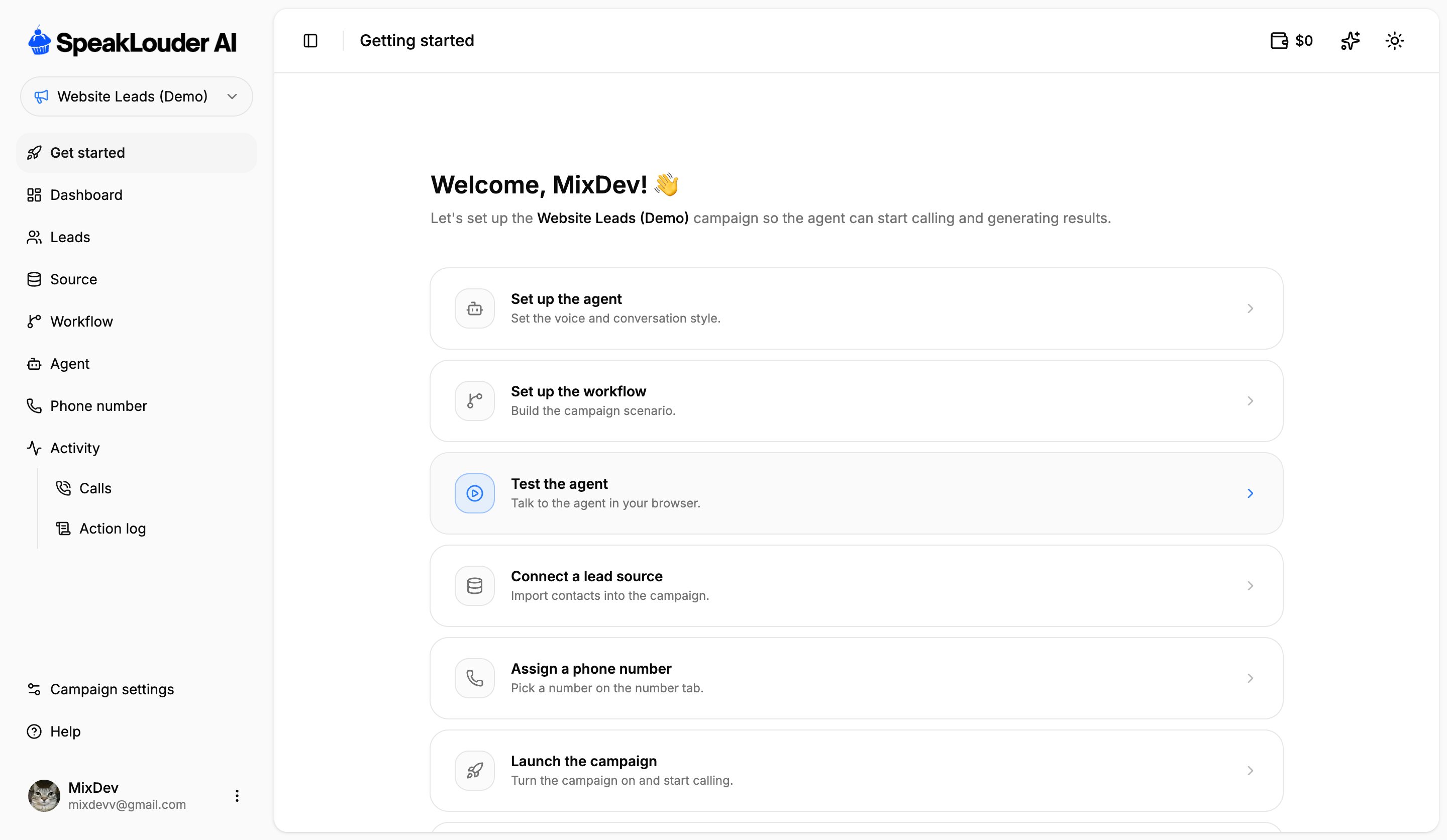 In order: **set up the agent**, **set up the workflow**, **test the agent** (a browser conversation, free of charge), **connect a lead source**, **assign a phone number**, and finally **launch the campaign**.
Further down there are shortcuts to help: a free consultation with an expert and this documentation.
The checklist stays put even after everything is configured, treat it as a reference. For day-to-day work, use the **Dashboard** tab in the campaign menu.
In order: **set up the agent**, **set up the workflow**, **test the agent** (a browser conversation, free of charge), **connect a lead source**, **assign a phone number**, and finally **launch the campaign**.
Further down there are shortcuts to help: a free consultation with an expert and this documentation.
The checklist stays put even after everything is configured, treat it as a reference. For day-to-day work, use the **Dashboard** tab in the campaign menu.