> ## Documentation Index
> Fetch the complete documentation index at: https://docs.speaklouder.ai/llms.txt
> Use this file to discover all available pages before exploring further.
# Leads
> The CRM list of every contact in the campaign, and the detail card for a single lead.
**Leads** is the CRM for one campaign: every contact that came in, what the agent did with them and how each conversation ended. Where those contacts come from is set up separately, in [Source](/en/campaigns/source).
## The list
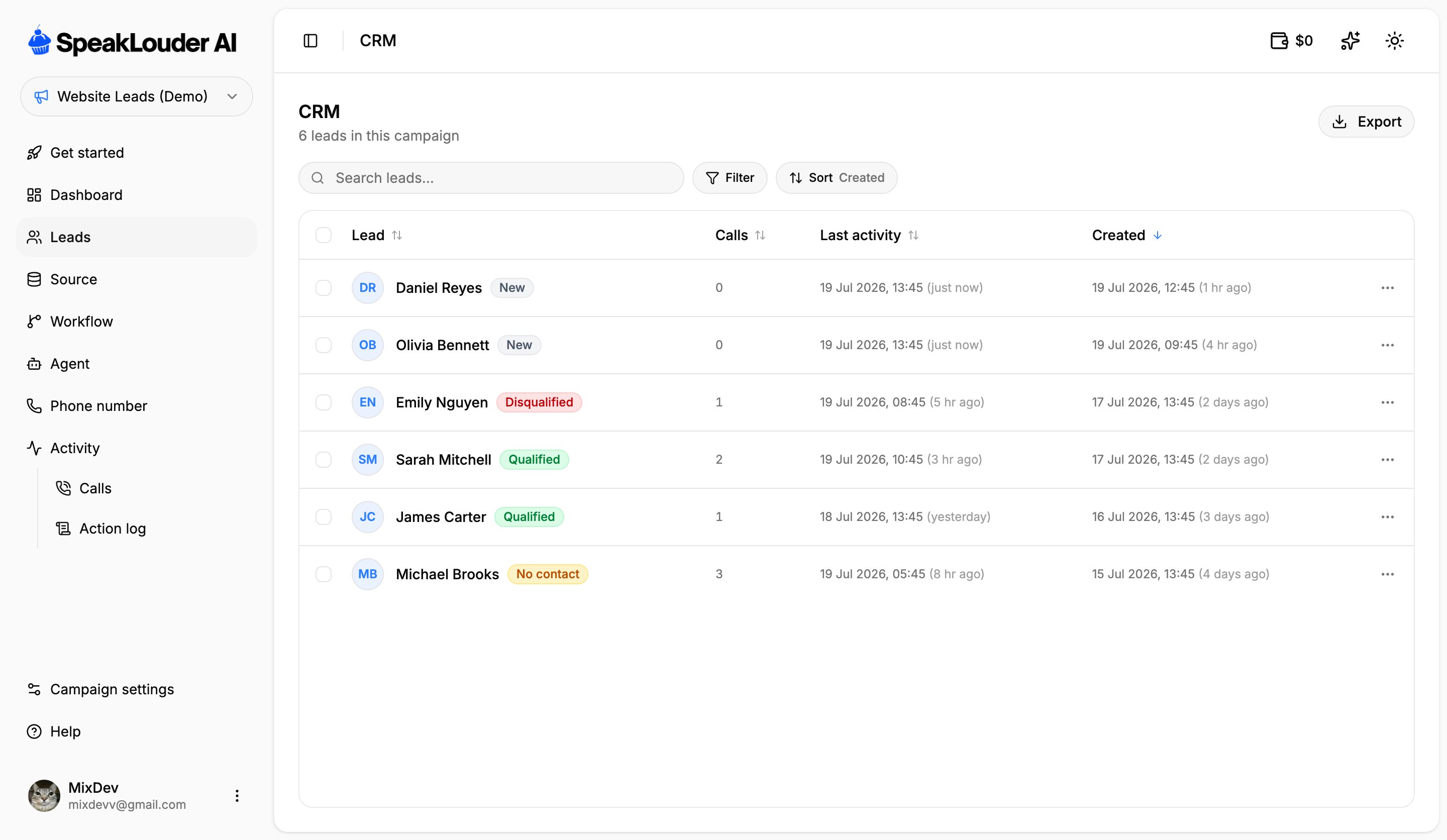 Each row is one lead: name, **status**, number of calls, when something last happened and when the lead was added. Click a row to open the lead card.
### Statuses
* **New**: in the campaign, not called yet.
* **In progress**: the sequence has started, the agent hasn't reached a verdict yet.
* **Qualified**: the agent decided the lead is interested.
* **Disqualified**: the conversation happened, but there was no interest.
* **No contact**: nobody picked up.
### Finding leads
* **Search**: by name, email or phone number.
* **Filter**: narrow the list down to one or more statuses.
* **Sort**: by lead, number of calls, last activity or date added. Click a column header to flip the direction.
### Working with several leads at once
The checkbox on the left of each row (and the one in the header, which selects everything) lets you act on a group of leads at once.
**Export** downloads the list as a file, so you can hand it to a salesperson or move it into another system.
## The lead card
Each row is one lead: name, **status**, number of calls, when something last happened and when the lead was added. Click a row to open the lead card.
### Statuses
* **New**: in the campaign, not called yet.
* **In progress**: the sequence has started, the agent hasn't reached a verdict yet.
* **Qualified**: the agent decided the lead is interested.
* **Disqualified**: the conversation happened, but there was no interest.
* **No contact**: nobody picked up.
### Finding leads
* **Search**: by name, email or phone number.
* **Filter**: narrow the list down to one or more statuses.
* **Sort**: by lead, number of calls, last activity or date added. Click a column header to flip the direction.
### Working with several leads at once
The checkbox on the left of each row (and the one in the header, which selects everything) lets you act on a group of leads at once.
**Export** downloads the list as a file, so you can hand it to a salesperson or move it into another system.
## The lead card
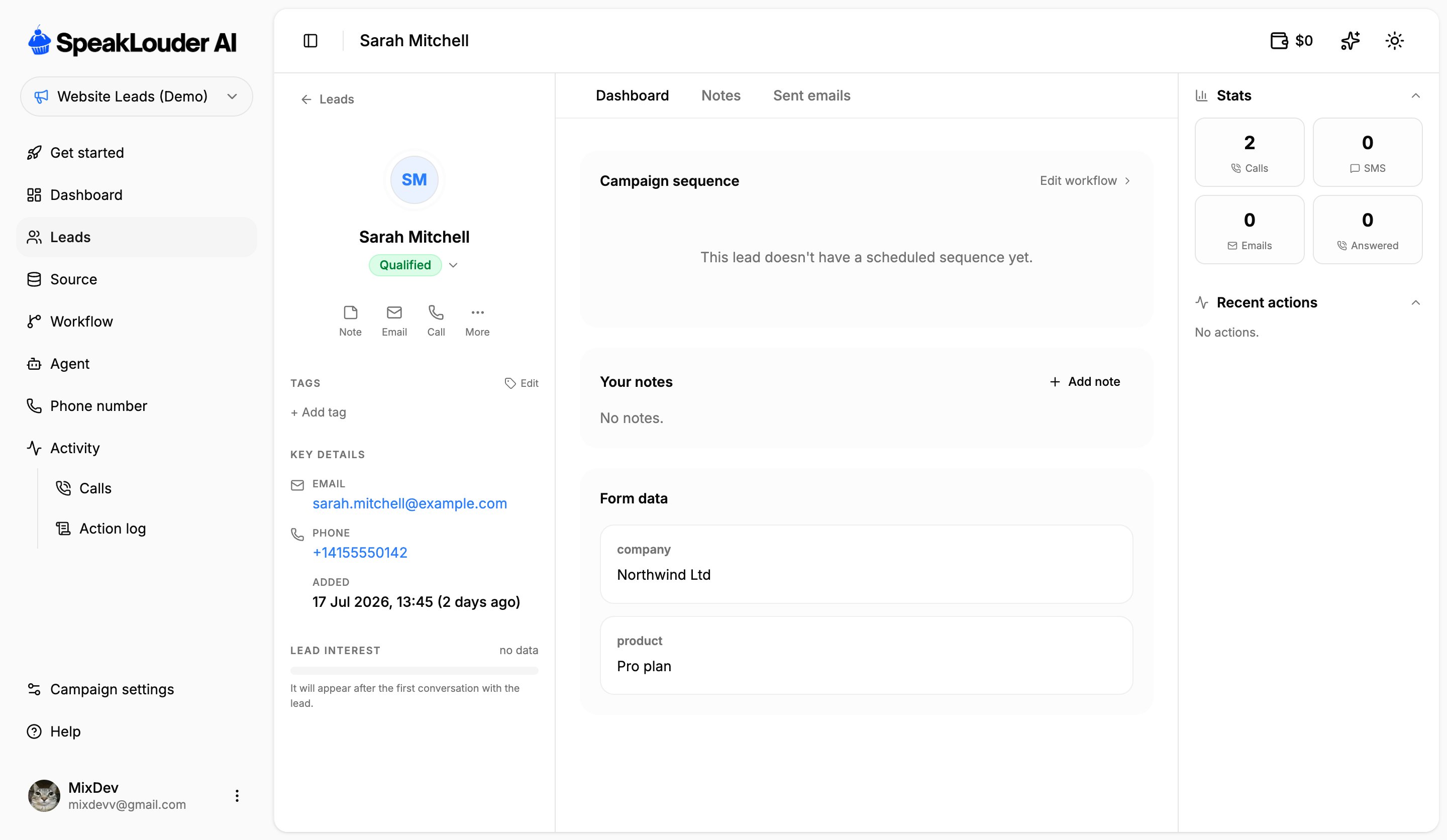 The left-hand column holds everything about the person: status (click it to change it by hand), quick actions (**Note**, **Email**, **Call**, **More**), plus tags, contact details and **Lead interest**.
**Lead interest** is a 0–100 score the AI assigns based on what was actually said in the calls. It stays empty until the first conversation happens, it isn't a field you fill in yourself.
In the middle there are three tabs:
* **Dashboard**: the campaign sequence for this lead (what has run, what is still scheduled), your notes, and **Form data**: everything the source sent along with the contact, including your own custom fields.
* **Notes**: the full history of notes on this lead.
* **Sent emails**: every follow-up email that went out.
On the right, **Stats** counts calls, SMS, emails and answered calls for this lead, and **Recent actions** lists what happened most recently.
**Form data** is the fastest way to check that your source is sending what you think it is. If a custom field is missing here, it never reached SpeakLouder, fix it in [Source](/en/campaigns/source).
The left-hand column holds everything about the person: status (click it to change it by hand), quick actions (**Note**, **Email**, **Call**, **More**), plus tags, contact details and **Lead interest**.
**Lead interest** is a 0–100 score the AI assigns based on what was actually said in the calls. It stays empty until the first conversation happens, it isn't a field you fill in yourself.
In the middle there are three tabs:
* **Dashboard**: the campaign sequence for this lead (what has run, what is still scheduled), your notes, and **Form data**: everything the source sent along with the contact, including your own custom fields.
* **Notes**: the full history of notes on this lead.
* **Sent emails**: every follow-up email that went out.
On the right, **Stats** counts calls, SMS, emails and answered calls for this lead, and **Recent actions** lists what happened most recently.
**Form data** is the fastest way to check that your source is sending what you think it is. If a custom field is missing here, it never reached SpeakLouder, fix it in [Source](/en/campaigns/source).